
RoleCultGifMaker
A free Windows app that turns a video or a YouTube link into a GIF or WebP. Cut the exact moment, crop the frame to a square or any shape, make it smaller - and get a light animation for chats, Discord and websites.
Бесплатная программа для Windows, которая превращает видео или ссылку YouTube в GIF или WebP. Вырежьте нужный момент, обрежьте кадр в квадрат или любую форму, уменьшите размер - и получите легкую анимацию для чатов, Discord и сайтов.
No installation, no accounts, no ads. Choose a file or paste a link, set the clip and the size, press one button.
Без установки, без регистрации, без рекламы. Выберите файл или вставьте ссылку, задайте отрезок и размер, нажмите одну кнопку.
♥ The program is free!♥ Программа бесплатная!
RoleCultGifMaker is free and always will be. If it helps you, you can support my work on Patreon - it helps me keep making new tools. RoleCultGifMaker бесплатный и таким останется. Если он вам пригодился, можно поддержать мою работу на Patreon - это помогает делать новые программы.
FeaturesВозможности
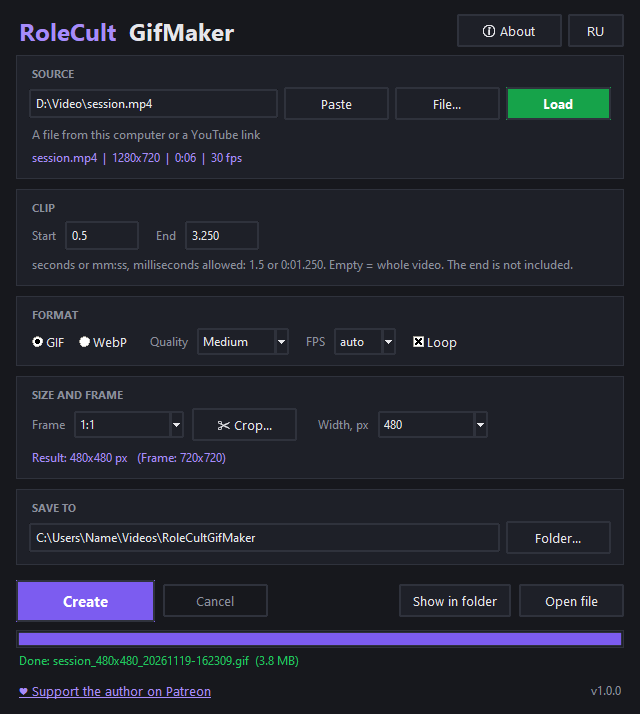
- Video or YouTube link: choose a file on your computer or paste a link and press Load.
- GIF or WebP, four quality levels, your own frame rate, loop on or off.
- Exact clip: start and end in seconds or mm:ss, even with milliseconds (1.5 or 0:01.250).
- Crop in one click: 1:1, 16:9, 9:16, 4:3, 3:4, 21:9 from the center of the frame.
- Your own crop: the "Crop..." button shows a real frame of the video - drag the frame, resize it by the corners, lock the ratio, pick the moment with a slider.
- Make it smaller: width from 1080 down to 64 px or your own number. The final size is shown before you start.
- Neat GIF: a separate color palette is built for every clip, so colors look clean.
- Progress and Cancel, buttons to open the file or show it in the folder.
- Remembers your settings, RU / EN.
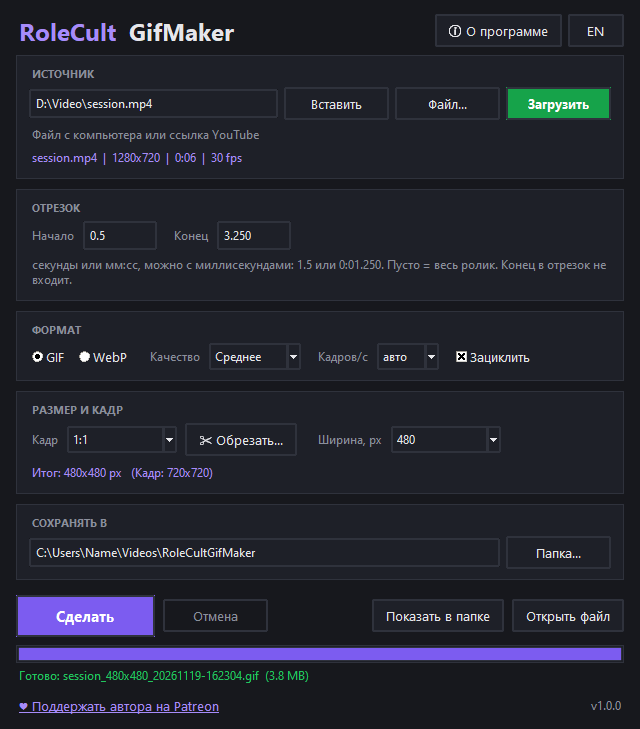
- Видео или ссылка YouTube: выберите файл на компьютере или вставьте ссылку и нажмите "Загрузить".
- GIF или WebP, четыре уровня качества, свой fps, зацикливание по желанию.
- Точный отрезок: начало и конец в секундах или мм:сс, можно с миллисекундами (1.5 или 0:01.250).
- Обрезка в один клик: 1:1, 16:9, 9:16, 4:3, 3:4, 21:9 по центру кадра.
- Своя обрезка: кнопка "Обрезать..." показывает настоящий кадр видео - двигайте рамку, тяните за углы, фиксируйте пропорции, выбирайте момент ползунком.
- Уменьшение: ширина от 1080 до 64 px или свое число. Итоговый размер виден до запуска.
- Аккуратный GIF: для каждого ролика строится своя палитра цветов, поэтому краски получаются чистыми.
- Прогресс и отмена, кнопки "Открыть файл" и "Показать в папке".
- Запоминает настройки, RU / EN.
First launch: Windows may show "Windows protected your PC" - click "More info", then "Run anyway". The app has no paid code signing certificate, that is all.
Первый запуск: Windows может показать окно "Система Windows защитила ваш компьютер" - нажмите "Подробнее", затем "Выполнить в любом случае". Просто у программы нет платной цифровой подписи.
You also need ffmpeg: the app uses the free ffmpeg (Windows builds: gyan.dev) and, for YouTube links, yt-dlp. Put ffmpeg.exe, ffprobe.exe and yt-dlp.exe next to RoleCultGifMaker.exe or add them to PATH. If something is missing, the program tells you at launch and gives these links.
Дополнительно нужен ffmpeg: программа использует бесплатный ffmpeg (сборки для Windows: gyan.dev) и, для ссылок YouTube, yt-dlp. Положите ffmpeg.exe, ffprobe.exe и yt-dlp.exe рядом с RoleCultGifMaker.exe или добавьте в PATH. Если чего-то не хватает, программа сама скажет об этом при запуске и даст эти ссылки.
Long clips: a GIF gets heavy very fast. For clips longer than a few seconds use WebP or a smaller width.
Длинные ролики: GIF очень быстро становится тяжелым. Для отрезков длиннее нескольких секунд берите WebP или меньшую ширину.